> ## Documentation Index
> Fetch the complete documentation index at: https://developers.fireblocks.com/llms.txt
> Use this file to discover all available pages before exploring further.
# API Co-signers Architecture Overview
## How automated signing and approvals work
### Overview
The API Co-signer automates two things that otherwise require manual user input on the Fireblocks mobile app:
* **Transaction signing** — a paired Signer or Admin API user contributes its MPC key share so the Co-signer can sign transactions on its behalf. This is the multi-signer MPC process the Fireblocks mobile app also participates in, with a set of independent Cloud Co-signers operated by Fireblocks each holding a key share alongside the API Co-signer. Refer to [About Fireblocks MPC](https://support.fireblocks.io/hc/en-us/articles/6984668676124-MPC-CMP) for background on the underlying MPC signing algorithm.
* **Transaction and configuration approvals** — a paired Non-Signing Admin or Approver API user casts approval decisions on transactions and, for Non-Signing Admins, on workspace configuration changes. Each user has their own approval key that the Co-signer uses to sign the approval; approvals do not run through MPC.
By hosting the Co-signer in your environment and pairing it with API users, you can configure the [Policies](https://support.fireblocks.io/hc/en-us/articles/29184395887772-About-Policies) to [designate the API user](https://support.fireblocks.io/hc/en-us/articles/29211687914268-Policy-rule-parameters#h_01KYS72RFHKWNZVCZGAMX77KAK) paired with the Co-signer as either the signer or an approver on rules that match your criteria. The Co-signer then signs or approves those requests automatically, without a human tapping the mobile app. A Co-signer fits workspaces with high transaction volume or frequent activity.
To run either automation, host the API Co-signer in your environment on a machine or virtual machine (VM) that supports enclaves. An enclave is a secure runtime that isolates and protects data and code, including from privileged users on that machine. Fireblocks API Co-signers operate on Intel SGX, AWS Nitro, or Google Cloud Confidential Spaces enclaves. They can be deployed on major cloud platforms such as Azure, AWS, Google Cloud, IBM Cloud, and Alibaba Cloud, as well as on-premises with Intel SGX-capable servers.
Fireblocks has fully integrated AWS Nitro Enclave technology. If you are currently using KMS-based AWS API Co-signers, it is recommended to upgrade to the latest Nitro version for enhanced security and performance.
Observe the diagram below, which illustrates how a transaction or configuration-change request flows from the console or API through Fireblocks' Policy Service, Configuration Manager, Signing Services, and Approval Service, and how it reaches the customer's API Co-signer, mobile device, API users, and the Fireblocks Cloud Co-signers #1 and #2.
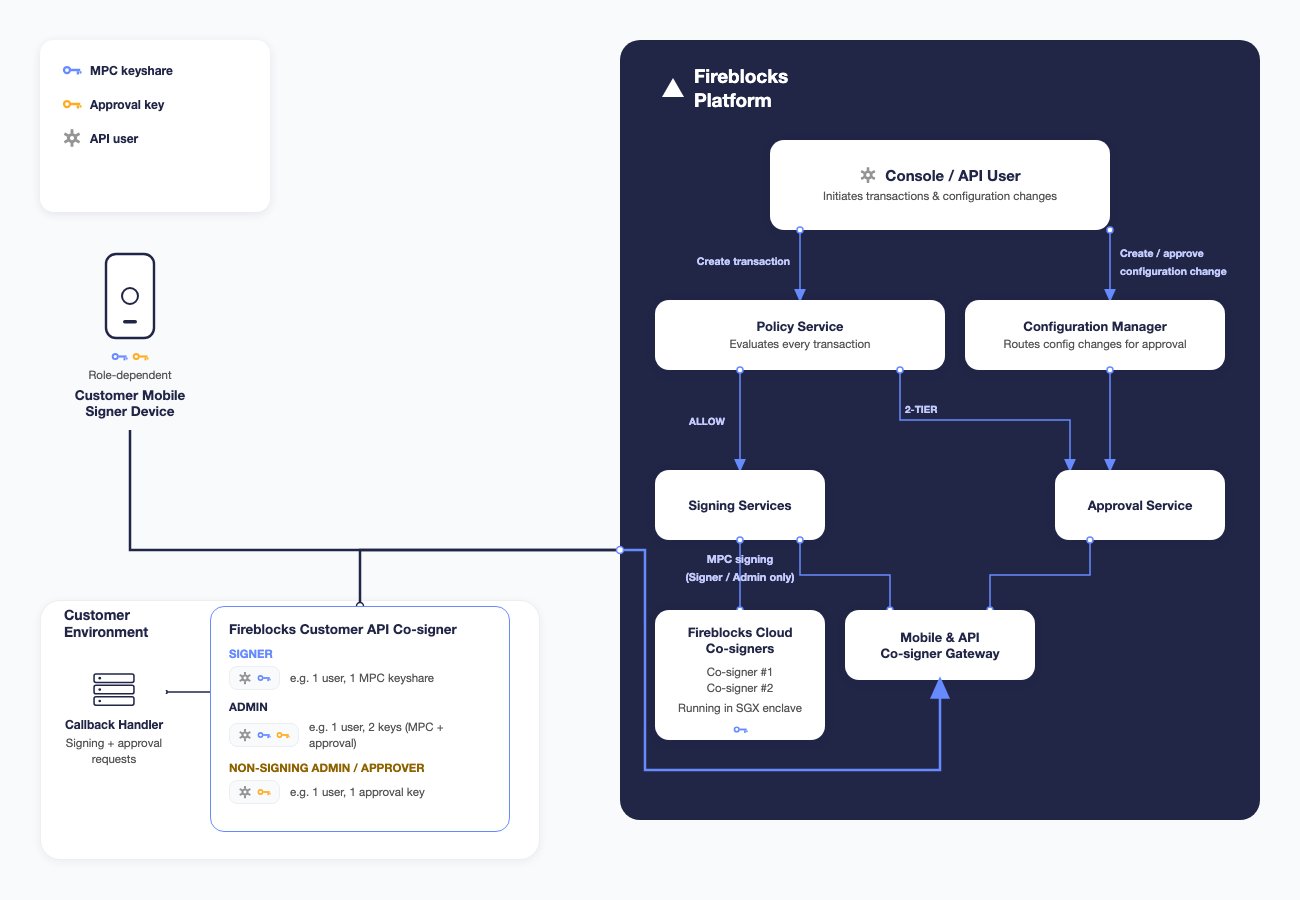 Refer to the articles below for detailed information on the specific architecture of each type of enclaved Co-signer:
* [Intel SGX Co-signer architecture running in Azure, IBM Cloud or Alibaba Cloud](/cosigners/sgx/intel-sgx-api-co-signer)
* [Nitro Co-signer architecture running in AWS](/cosigners/aws/aws-nitro-api-co-signer)
* [Confidential Space Co-signer architecture running in Google Cloud](/cosigners/google-cloud/gcp-confidential-space-api-co-signer)
### Using API users to connect the Co-signer to your workspace
To connect a new or existing Co-signer to your workspace, pair it with an API user from the workspace. Connecting an existing Co-signer with another workspace is supported for AWS Nitro, SGX, Azure; not supported for GCP. Existing Co-signers are typically associated with another workspace within your organization.
Pairing the Co-signer is performed using a JWT-encoded Pairing Token obtained from the Console for a specific API user. This token is used during Co-signer installation to pair the initial API key, enabling communication with Fireblocks' SaaS. The Co-signer is identified exclusively by the workspace and the API user used to establish the connection.
The pairing process for the first API user requires admin-level access to the Fireblocks Console and root access to the Co-signer’s VM. During this process, you will provide the Co-signer with a pairing token linked to the API user, enabling the platform to recognize the Co-signer and associate it with the Workspace.
You can pair multiple API users to a single Co-signer. Additionally, API users from different Workspaces can be paired with the same API Co-signer, except when using the GCP Confidential Space Co-signer.
### Connecting your business logic to the Co-signer
You can optionally connect your business logic to the Co-signer through a feature called a Callback Handler, configured per API user. The Callback Handler is an HTTPS server that receives requests from the Co-signer at a designated endpoint whenever a signing request (for Signer or Admin API users) or an approval request (for Non-Signing Admin or Approver API users) is triggered. The Callback Handler responds with an action, such as approving or denying the request. If no Callback Handler is configured, the Co-signer automatically signs or approves all requests for that API user.
Within a single Co-signer, some API users can operate with a configured Callback Handler, while others can function without it. When configuring a Callback Handler for a paired API user, you specify the URL of the Callback Handler server and select a secure communication method to establish a secure channel.
**Cold workspaces**
In cold workspaces, the API Co-signer participates in the approval stage only. Transaction signing is performed offline using the cold mobile app, so the Co-signer never signs. The API user roles that can be paired with a Co-signer in a cold workspace, and therefore can have a Callback Handler, are:
* **Non-Signing Admin** — transaction approvals and configuration change approvals.
* **Approver** — transaction approvals.
The Callback Handler fires during approval requests for these users.
Refer to [Setup API Co-signer Callback Handler](/cosigners/callback-handler/create-api-co-signer-callback-handler) to learn more about it.
### Callback best practices
When a signing or approval request reaches the API Co-signer, the callback is invoked with the request details. We recommend closely monitoring this communication to ensure the callback responds quickly and reliably, as the Co-signer does not sign or cast its approval until the callback approves the request.
## Installing an API Co-signer
### Available API Co-signer types
Fireblocks provides multiple deployment options for API Co-signers, available in both cloud environments and on-premises, in regions that meet the necessary enclave technology requirements. These deployment options leverage various enclave technologies to safeguard the API user keys stored in the Co-signer (MPC key shares for Signers and Admins, approval keys for Non-Signing Admins and Approvers), allowing you to select the solution that aligns best with your production environment requirements.
For the Console steps, the pairing token, and where to go next, see [Installation](/cosigners/overview/api-cosigner-installation-flow). The commands for each platform are on that platform's Install page.
### High-throughput workspaces
For high-throughput workspaces, we recommend setting up more than one API Co-Signer. This setup enables both high availability and load balancing between Co-Signers, allowing for higher overall throughput.
The required number of Co-Signers is determined by the number of in-flight transactions in the signing phase. As a rule of thumb, maintain one Co-Signer (with a single vCPU) per every 2.5 TPS.
**Learn more**
* [Configuring Multiple API Co-signers in High Availability](/cosigners/operations/multiple-cosigners-high-availability)
* [Installation](/cosigners/overview/api-cosigner-installation-flow)
### Host type recommendations
We recommend using at least a **Standard\_DC4s\_v3** instance on Azure. AWS and GCP instance recommendations are TBD. In addition, we recommend using the latest Co-signer version.
The table below summarizes key considerations per cloud provider:
| Provider | Key Considerations |
| :- | :- |
| **Azure (SGX-based)** | Provides hardware security at the highest security level, relying only on Fireblocks and Intel. Because SGX is CPU-based, it has performance limitations including reduced speed, limited memory, and a fixed number of threads. As a result, it is the slowest option. |
| **AWS Nitro** | Requires trust in AWS for both hardware and security. This is still a confidential computing solution, but the cloud provider is part of the threat model. AWS is a highly reputable, publicly traded company with strong engineering practices. |
| **GCP** | Recommended if you are required to use Google Cloud. Like AWS Nitro, this is a confidential computing solution where the cloud provider is part of the threat model. |
**Best practices**
* For **maximum security:** select Azure + SGX
* For **best performance:** select AWS + Nitro
### Available enclave types
Learn more about the enclave technologies Fireblocks uses by referring to the following resources:
* [Microsoft Azure SGX Enclave-capable Confidential Compute VM](https://learn.microsoft.com/en-us/azure/confidential-computing/confidential-computing-enclaves)
* On-Premise [Intel SGX-enabled Processors](https://www.intel.com/content/www/us/en/architecture-and-technology/software-guard-extensions-processors.html)
* [AWS Nitro Enclave-capable EC2 instance](https://aws.amazon.com/ec2/nitro/nitro-enclaves/)
* [Google Cloud Confidential Space workload container](https://cloud.google.com/confidential-computing/confidential-space/docs/confidential-space-overview)
* [IBM Cloud Bare Metal Servers SGX-capable machine](https://cloud.ibm.com/docs/bare-metal?topic=bare-metal-bm-server-provision-sgx)
* [Alibaba Cloud Intel SGX-capable Elastic Compute Service (ECS) instance](https://www.alibabacloud.com/help/en/ecs/user-guide/build-an-sgx-encrypted-computing-environment)
## Configuring your workspace to sign or approve using an API Co-signer
To enable the API Co-signer to participate in signing or in approvals, pair it with an API user from your workspace. Pairing generates the keys that user needs to act, and stores them securely inside your Co-signer.
The API user's role determines which keys are generated and what the Co-signer can automate on its behalf:
* **Signer or Admin** — pairing generates a unique MPC key share (stored inside your Co-signer, with matching shares on Cloud Co-signers #1 and #2) plus a workspace configuration key. The Co-signer can sign transactions on the API user's behalf through the multi-signer MPC process, and Admins can also cast configuration change approvals.
* **Non-Signing Admin** — pairing generates the API user's approval key inside your Co-signer. The Co-signer can automate the API user's approvals on transactions and on workspace configuration changes. It cannot sign.
* **Approver** — pairing generates the API user's approval key inside your Co-signer. The Co-signer can automate the API user's approvals on transactions. It cannot sign.
Refer to [User roles](https://support.fireblocks.io/hc/en-us/articles/360012832959-User-roles) for the full role reference.
To activate the automation, configure the [Policies](https://support.fireblocks.io/hc/en-us/articles/29184395887772-About-Policies) to [designate the paired API user](https://support.fireblocks.io/hc/en-us/articles/29211687914268-Policy-rule-parameters#h_01KYS72RFHKWNZVCZGAMX77KAK) as the signer or as an approver on the rules you want to automate. When a transaction or configuration change matches a rule, the request is routed to the Co-signer paired with that API user.
The end-to-end flow using the Fireblocks REST API, the API Co-signer, and the optional Callback Handler proceeds as follows:
1. A new transaction or configuration change is initiated using the Fireblocks API and generated on the backend.
2. The request is evaluated against your Policies to determine who must sign and approve it.
3. If an API user paired with an API Co-signer is designated in the Policy as the signer or as an approver, the request is sent to the Co-signer associated with that API user.
4. The API Co-signer, hosted in your secure environment, polls the Fireblocks SaaS for pending requests. If a request is available, the SaaS immediately provides the request details.
5. If a Callback Handler is configured for that API user, the API Co-signer sends a secure request to the Callback Handler for a decision.
6. If the Callback Handler responds with "approved," the Co-signer completes the request: for Signer or Admin API users it signs the transaction in coordination with Fireblocks' Cloud Co-signers through the MPC process, and for Non-Signing Admin or Approver API users it uses the API user's approval key to sign the approval. If the response is "rejected," the request is declined. If the Callback Handler does not respond within 30 seconds or returns "retry," the request fails. Refer to [Setup API Co-signer Callback Handler](/cosigners/callback-handler/create-api-co-signer-callback-handler) to learn more.
## Manage paired API users
After the Co-signer is connected, you can pair additional API users, configure a Callback Handler, unpair an API user, or rename the Co-signer. See [Operating the API Co-signer](/cosigners/operations/api-cosigner-operate).
## Communal Test Co-signer
A Testnet workspace can use a Communal Test Co-signer that Fireblocks hosts, instead of installing one first. See [Using the Communal Test Co-signer](/cosigners/overview/use-communal-cosigner).
Refer to the articles below for detailed information on the specific architecture of each type of enclaved Co-signer:
* [Intel SGX Co-signer architecture running in Azure, IBM Cloud or Alibaba Cloud](/cosigners/sgx/intel-sgx-api-co-signer)
* [Nitro Co-signer architecture running in AWS](/cosigners/aws/aws-nitro-api-co-signer)
* [Confidential Space Co-signer architecture running in Google Cloud](/cosigners/google-cloud/gcp-confidential-space-api-co-signer)
### Using API users to connect the Co-signer to your workspace
To connect a new or existing Co-signer to your workspace, pair it with an API user from the workspace. Connecting an existing Co-signer with another workspace is supported for AWS Nitro, SGX, Azure; not supported for GCP. Existing Co-signers are typically associated with another workspace within your organization.
Pairing the Co-signer is performed using a JWT-encoded Pairing Token obtained from the Console for a specific API user. This token is used during Co-signer installation to pair the initial API key, enabling communication with Fireblocks' SaaS. The Co-signer is identified exclusively by the workspace and the API user used to establish the connection.
The pairing process for the first API user requires admin-level access to the Fireblocks Console and root access to the Co-signer’s VM. During this process, you will provide the Co-signer with a pairing token linked to the API user, enabling the platform to recognize the Co-signer and associate it with the Workspace.
You can pair multiple API users to a single Co-signer. Additionally, API users from different Workspaces can be paired with the same API Co-signer, except when using the GCP Confidential Space Co-signer.
### Connecting your business logic to the Co-signer
You can optionally connect your business logic to the Co-signer through a feature called a Callback Handler, configured per API user. The Callback Handler is an HTTPS server that receives requests from the Co-signer at a designated endpoint whenever a signing request (for Signer or Admin API users) or an approval request (for Non-Signing Admin or Approver API users) is triggered. The Callback Handler responds with an action, such as approving or denying the request. If no Callback Handler is configured, the Co-signer automatically signs or approves all requests for that API user.
Within a single Co-signer, some API users can operate with a configured Callback Handler, while others can function without it. When configuring a Callback Handler for a paired API user, you specify the URL of the Callback Handler server and select a secure communication method to establish a secure channel.
**Cold workspaces**
In cold workspaces, the API Co-signer participates in the approval stage only. Transaction signing is performed offline using the cold mobile app, so the Co-signer never signs. The API user roles that can be paired with a Co-signer in a cold workspace, and therefore can have a Callback Handler, are:
* **Non-Signing Admin** — transaction approvals and configuration change approvals.
* **Approver** — transaction approvals.
The Callback Handler fires during approval requests for these users.
Refer to [Setup API Co-signer Callback Handler](/cosigners/callback-handler/create-api-co-signer-callback-handler) to learn more about it.
### Callback best practices
When a signing or approval request reaches the API Co-signer, the callback is invoked with the request details. We recommend closely monitoring this communication to ensure the callback responds quickly and reliably, as the Co-signer does not sign or cast its approval until the callback approves the request.
## Installing an API Co-signer
### Available API Co-signer types
Fireblocks provides multiple deployment options for API Co-signers, available in both cloud environments and on-premises, in regions that meet the necessary enclave technology requirements. These deployment options leverage various enclave technologies to safeguard the API user keys stored in the Co-signer (MPC key shares for Signers and Admins, approval keys for Non-Signing Admins and Approvers), allowing you to select the solution that aligns best with your production environment requirements.
For the Console steps, the pairing token, and where to go next, see [Installation](/cosigners/overview/api-cosigner-installation-flow). The commands for each platform are on that platform's Install page.
### High-throughput workspaces
For high-throughput workspaces, we recommend setting up more than one API Co-Signer. This setup enables both high availability and load balancing between Co-Signers, allowing for higher overall throughput.
The required number of Co-Signers is determined by the number of in-flight transactions in the signing phase. As a rule of thumb, maintain one Co-Signer (with a single vCPU) per every 2.5 TPS.
**Learn more**
* [Configuring Multiple API Co-signers in High Availability](/cosigners/operations/multiple-cosigners-high-availability)
* [Installation](/cosigners/overview/api-cosigner-installation-flow)
### Host type recommendations
We recommend using at least a **Standard\_DC4s\_v3** instance on Azure. AWS and GCP instance recommendations are TBD. In addition, we recommend using the latest Co-signer version.
The table below summarizes key considerations per cloud provider:
| Provider | Key Considerations |
| :- | :- |
| **Azure (SGX-based)** | Provides hardware security at the highest security level, relying only on Fireblocks and Intel. Because SGX is CPU-based, it has performance limitations including reduced speed, limited memory, and a fixed number of threads. As a result, it is the slowest option. |
| **AWS Nitro** | Requires trust in AWS for both hardware and security. This is still a confidential computing solution, but the cloud provider is part of the threat model. AWS is a highly reputable, publicly traded company with strong engineering practices. |
| **GCP** | Recommended if you are required to use Google Cloud. Like AWS Nitro, this is a confidential computing solution where the cloud provider is part of the threat model. |
**Best practices**
* For **maximum security:** select Azure + SGX
* For **best performance:** select AWS + Nitro
### Available enclave types
Learn more about the enclave technologies Fireblocks uses by referring to the following resources:
* [Microsoft Azure SGX Enclave-capable Confidential Compute VM](https://learn.microsoft.com/en-us/azure/confidential-computing/confidential-computing-enclaves)
* On-Premise [Intel SGX-enabled Processors](https://www.intel.com/content/www/us/en/architecture-and-technology/software-guard-extensions-processors.html)
* [AWS Nitro Enclave-capable EC2 instance](https://aws.amazon.com/ec2/nitro/nitro-enclaves/)
* [Google Cloud Confidential Space workload container](https://cloud.google.com/confidential-computing/confidential-space/docs/confidential-space-overview)
* [IBM Cloud Bare Metal Servers SGX-capable machine](https://cloud.ibm.com/docs/bare-metal?topic=bare-metal-bm-server-provision-sgx)
* [Alibaba Cloud Intel SGX-capable Elastic Compute Service (ECS) instance](https://www.alibabacloud.com/help/en/ecs/user-guide/build-an-sgx-encrypted-computing-environment)
## Configuring your workspace to sign or approve using an API Co-signer
To enable the API Co-signer to participate in signing or in approvals, pair it with an API user from your workspace. Pairing generates the keys that user needs to act, and stores them securely inside your Co-signer.
The API user's role determines which keys are generated and what the Co-signer can automate on its behalf:
* **Signer or Admin** — pairing generates a unique MPC key share (stored inside your Co-signer, with matching shares on Cloud Co-signers #1 and #2) plus a workspace configuration key. The Co-signer can sign transactions on the API user's behalf through the multi-signer MPC process, and Admins can also cast configuration change approvals.
* **Non-Signing Admin** — pairing generates the API user's approval key inside your Co-signer. The Co-signer can automate the API user's approvals on transactions and on workspace configuration changes. It cannot sign.
* **Approver** — pairing generates the API user's approval key inside your Co-signer. The Co-signer can automate the API user's approvals on transactions. It cannot sign.
Refer to [User roles](https://support.fireblocks.io/hc/en-us/articles/360012832959-User-roles) for the full role reference.
To activate the automation, configure the [Policies](https://support.fireblocks.io/hc/en-us/articles/29184395887772-About-Policies) to [designate the paired API user](https://support.fireblocks.io/hc/en-us/articles/29211687914268-Policy-rule-parameters#h_01KYS72RFHKWNZVCZGAMX77KAK) as the signer or as an approver on the rules you want to automate. When a transaction or configuration change matches a rule, the request is routed to the Co-signer paired with that API user.
The end-to-end flow using the Fireblocks REST API, the API Co-signer, and the optional Callback Handler proceeds as follows:
1. A new transaction or configuration change is initiated using the Fireblocks API and generated on the backend.
2. The request is evaluated against your Policies to determine who must sign and approve it.
3. If an API user paired with an API Co-signer is designated in the Policy as the signer or as an approver, the request is sent to the Co-signer associated with that API user.
4. The API Co-signer, hosted in your secure environment, polls the Fireblocks SaaS for pending requests. If a request is available, the SaaS immediately provides the request details.
5. If a Callback Handler is configured for that API user, the API Co-signer sends a secure request to the Callback Handler for a decision.
6. If the Callback Handler responds with "approved," the Co-signer completes the request: for Signer or Admin API users it signs the transaction in coordination with Fireblocks' Cloud Co-signers through the MPC process, and for Non-Signing Admin or Approver API users it uses the API user's approval key to sign the approval. If the response is "rejected," the request is declined. If the Callback Handler does not respond within 30 seconds or returns "retry," the request fails. Refer to [Setup API Co-signer Callback Handler](/cosigners/callback-handler/create-api-co-signer-callback-handler) to learn more.
## Manage paired API users
After the Co-signer is connected, you can pair additional API users, configure a Callback Handler, unpair an API user, or rename the Co-signer. See [Operating the API Co-signer](/cosigners/operations/api-cosigner-operate).
## Communal Test Co-signer
A Testnet workspace can use a Communal Test Co-signer that Fireblocks hosts, instead of installing one first. See [Using the Communal Test Co-signer](/cosigners/overview/use-communal-cosigner).