> ## Documentation Index
> Fetch the complete documentation index at: https://developers.fireblocks.com/llms.txt
> Use this file to discover all available pages before exploring further.
# Bridging ERC20F Tokens with LayerZero Adapters
This guide shows you how to deploy and configure adapter contracts for ERC20F tokens to enable cross-chain bridging with the LayerZero protocol.
Adapters use a mint/burn mechanism to maintain the total token supply across multiple blockchains:
* Burn on chain A, mint on chain B
* Burn on chain B, mint on chain A
Fireblocks adapters work natively with ERC20F tokens, and can also integrate with other ERC20 tokens that use AccessControl with `MINTER_ROLE` and `BURNER_ROLE`.
# Prerequisites
Before you begin, make sure you have:
* **Two ERC20F tokens deployed** on different blockchains and linked to your workspace
* [Issue Token endpoint](/reference/issue-new-erc-20f-tokens)
* [Issue Token Multichain endpoint](/reference/sdk-multichain-deployment)
* **Token link IDs** for both tokens
* **Vault account** with enough native gas tokens on each chain
* **Admin addresses** for:
* `DEFAULT_ADMIN_ROLE → defaultAdminAddress`
* `CONTRACT_ADMIN_ROLE → delegateAddress`
* `PAUSER_ROLE → pauserAddress`
# Step 1: Initialize the SDK
```javascript theme={"system"}
`import { Fireblocks, BasePath } from '@fireblocks/ts-sdk';
const fireblocksSdk = new Fireblocks({
apiKey: 'your-api-key',
basePath: BasePath.US, // Use BasePath.EU for EU region
secretKey: 'your-private-key',
});
```
# Step 2: Deploy Adapters
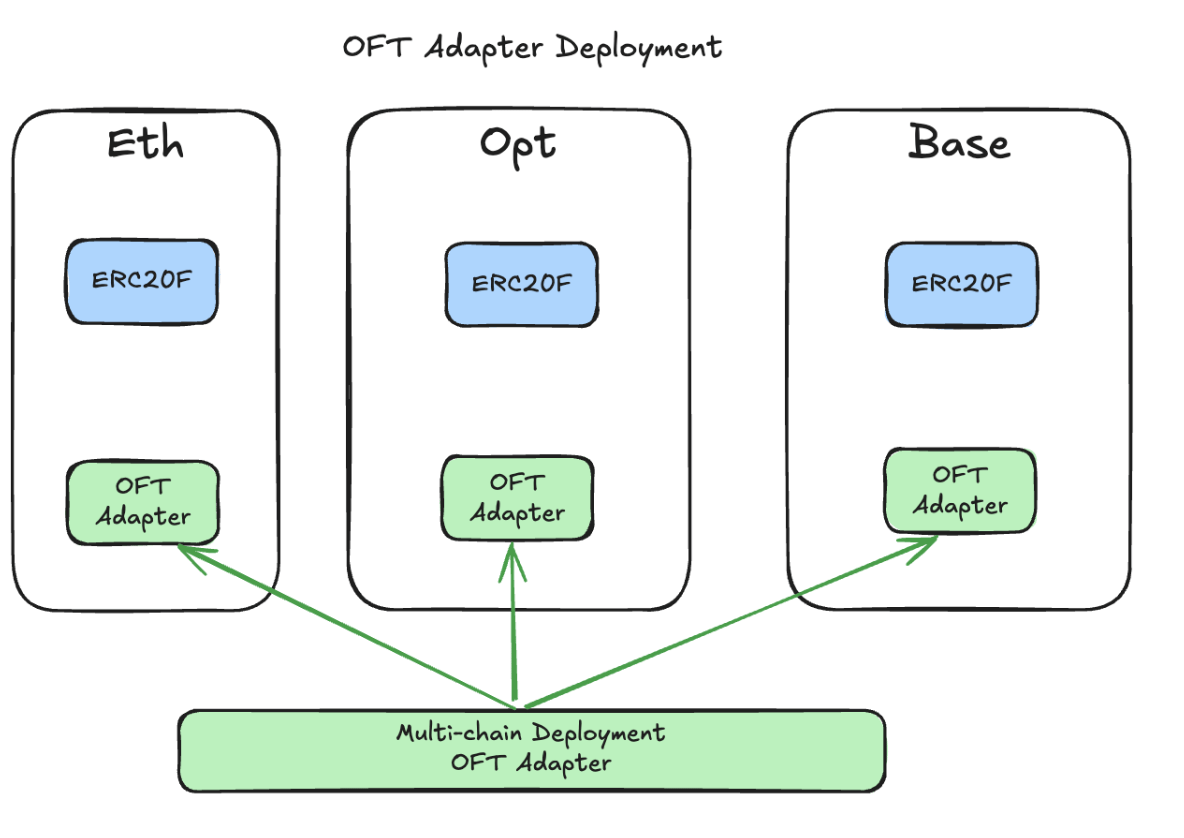 Deploy adapters with `deployAndLinkAdapters`. This generates three transactions per adapter:
* Contract deployment
* Grant `MINTER_ROLE`
* Grant `BURNER_ROLE`
```javascript theme={"system"}
const deployAdaptersRequest = {
vaultAccountId: '0',
createParams: [
{
tokenLinkId: 'first-token-link-id',
delegateAddress: '0x...',
defaultAdminAddress: '0x...',
pauserAddress: '0x...',
},
{
tokenLinkId: 'second-token-link-id',
delegateAddress: '0x...',
defaultAdminAddress: '0x...',
pauserAddress: '0x...',
},
],
displayName: 'LayerZero Adapters',
gasless: false, // Optional: Use gasless deployment
};
const deployResponse = await fireblocksSdk.tokenization.deployAndLinkAdapters({
deployLayerZeroAdaptersRequest: deployAdaptersRequest,
});
console.log('Adapter deployment initiated:', deployResponse);
```
Save the returned `adapterLinkId` values for the next steps.
# Step 3: Configure Adapter Peers
Deploy adapters with `deployAndLinkAdapters`. This generates three transactions per adapter:
* Contract deployment
* Grant `MINTER_ROLE`
* Grant `BURNER_ROLE`
```javascript theme={"system"}
const deployAdaptersRequest = {
vaultAccountId: '0',
createParams: [
{
tokenLinkId: 'first-token-link-id',
delegateAddress: '0x...',
defaultAdminAddress: '0x...',
pauserAddress: '0x...',
},
{
tokenLinkId: 'second-token-link-id',
delegateAddress: '0x...',
defaultAdminAddress: '0x...',
pauserAddress: '0x...',
},
],
displayName: 'LayerZero Adapters',
gasless: false, // Optional: Use gasless deployment
};
const deployResponse = await fireblocksSdk.tokenization.deployAndLinkAdapters({
deployLayerZeroAdaptersRequest: deployAdaptersRequest,
});
console.log('Adapter deployment initiated:', deployResponse);
```
Save the returned `adapterLinkId` values for the next steps.
# Step 3: Configure Adapter Peers
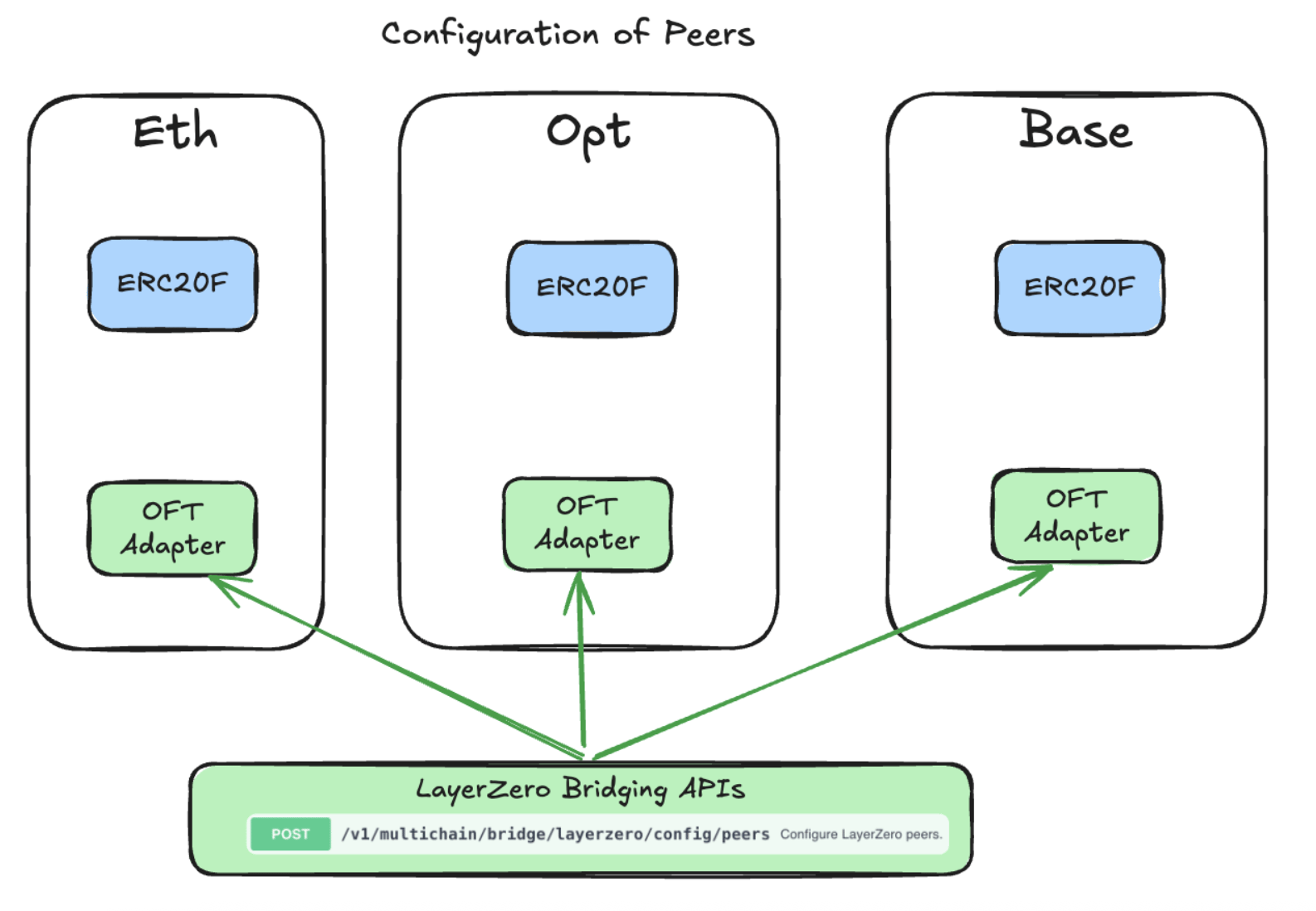 Set adapters as bidirectional peers:
```javascript theme={"system"}
const setPeersRequest = {
vaultAccountId: '0',
sourceAdapterTokenLinkId: 'first-adapter-link-id',
destinationAdapterTokenLinkIds: ['second-adapter-link-id'],
bidirectional: true,
};
await fireblocksSdk.tokenization.setLayerZeroPeers({
setLayerZeroPeersRequestDto: setPeersRequest,
});
```
You can introspect peers with the `getLayerZeroPeers` function of the SDK.
# Step 4: Configure Decentralized Verifier Networks (DVNs)
LayerZero uses DVNs for message verification. You need to fetch the current DVN configuration and then explicitly set it for your adapter channels.
## Fetch current configuration
```javascript theme={"system"}
const dvnConfig = await fireblocksSdk.tokenization.getLayerZeroDvnConfig({
adapterTokenLinkId: 'your-adapter-link-id',
});
console.log('Current DVN configuration:', dvnConfig);
```
## Set configuration
```javascript theme={"system"}
const setDvnConfigRequest = {
vaultAccountId: '0',
sourceAdapterTokenLinkId: 'first-adapter-link-id',
destinationAdapterTokenLinkId: 'second-adapter-link-id',
sendConfig: {
requiredDVNs: ['0xDVN1','0xDVN2'],
optionalDVNs: [],
optionalDVNThreshold: 0,
},
receiveConfig: {
requiredDVNs: ['0xDVN1','0xDVN2'],
optionalDVNs: [],
optionalDVNThreshold: 0,
},
};
await fireblocksSdk.tokenization.setLayerZeroDvnConfig({
setLayerZeroDvnConfigRequestDto: setDvnConfigRequest,
});
```
# Troubleshooting
* Insufficient gas: Top up native tokens on both chains
* Role errors: Verify all admin addresses
* Peer setup issues: Make sure both adapters are deployed before linking
* DVN errors: Run `validateLayerZeroChannelConfig` for diagnostics
# Next Steps
After setup, you can:
* Test cross-chain transfers (`approve`, `quoteSend`, then `send`)
* Bridge tokens directly via adapter contracts (`quoteSend` → `send`).
* Add more adapters for additional chains
* Customize DVN settings for advanced verification
# Related Docs
* [Fireblocks API Reference – Multichain](/reference/)
* [LayerZero Documentation](https://docs.layerzero.network/)
* [ERC20F Token Guide](/reference/operational-guide-for-erc20f-token)
Set adapters as bidirectional peers:
```javascript theme={"system"}
const setPeersRequest = {
vaultAccountId: '0',
sourceAdapterTokenLinkId: 'first-adapter-link-id',
destinationAdapterTokenLinkIds: ['second-adapter-link-id'],
bidirectional: true,
};
await fireblocksSdk.tokenization.setLayerZeroPeers({
setLayerZeroPeersRequestDto: setPeersRequest,
});
```
You can introspect peers with the `getLayerZeroPeers` function of the SDK.
# Step 4: Configure Decentralized Verifier Networks (DVNs)
LayerZero uses DVNs for message verification. You need to fetch the current DVN configuration and then explicitly set it for your adapter channels.
## Fetch current configuration
```javascript theme={"system"}
const dvnConfig = await fireblocksSdk.tokenization.getLayerZeroDvnConfig({
adapterTokenLinkId: 'your-adapter-link-id',
});
console.log('Current DVN configuration:', dvnConfig);
```
## Set configuration
```javascript theme={"system"}
const setDvnConfigRequest = {
vaultAccountId: '0',
sourceAdapterTokenLinkId: 'first-adapter-link-id',
destinationAdapterTokenLinkId: 'second-adapter-link-id',
sendConfig: {
requiredDVNs: ['0xDVN1','0xDVN2'],
optionalDVNs: [],
optionalDVNThreshold: 0,
},
receiveConfig: {
requiredDVNs: ['0xDVN1','0xDVN2'],
optionalDVNs: [],
optionalDVNThreshold: 0,
},
};
await fireblocksSdk.tokenization.setLayerZeroDvnConfig({
setLayerZeroDvnConfigRequestDto: setDvnConfigRequest,
});
```
# Troubleshooting
* Insufficient gas: Top up native tokens on both chains
* Role errors: Verify all admin addresses
* Peer setup issues: Make sure both adapters are deployed before linking
* DVN errors: Run `validateLayerZeroChannelConfig` for diagnostics
# Next Steps
After setup, you can:
* Test cross-chain transfers (`approve`, `quoteSend`, then `send`)
* Bridge tokens directly via adapter contracts (`quoteSend` → `send`).
* Add more adapters for additional chains
* Customize DVN settings for advanced verification
# Related Docs
* [Fireblocks API Reference – Multichain](/reference/)
* [LayerZero Documentation](https://docs.layerzero.network/)
* [ERC20F Token Guide](/reference/operational-guide-for-erc20f-token)