> ## Documentation Index
> Fetch the complete documentation index at: https://developers.fireblocks.com/llms.txt
> Use this file to discover all available pages before exploring further.
# Interact with Solana Programs
**Solana Program Calls require hot wallets**
Solana Program Calls require a hot wallet and cannot be used in cold workspaces.
Solana programs are on-chain executable codes that power the decentralized applications (dApps) and other functionalities within the Solana blockchain. They enable smart contract-like behavior, allowing developers to write logic that processes transactions and manages state.
## Solana transactions
A Solana transaction is a set of instructions bundled together to be executed automatically on the blockchain. It typically consists of the following components:
1. **Signatures:** A list of cryptographic signatures to authorize the transaction.
2. **Message:** The core of the transaction, which includes:
1. **Instructions:** The set of actions to be performed. Each instruction targets a specific program on the blockchain, includes accounts to be accessed or modified, and contains any necessary data for the operation.
2. **Account Keys:** A list of all accounts involved in the transaction.
3. **Recent Blockhash:** A reference to a recent block to ensure the transaction is processed promptly and prevent replay attacks.
When a transaction is submitted, it is signed by the relevant parties and serialized before being broadcast to the network.
Fireblocks simplifies interacting with Solana programs by allowing you to use the [createTransaction](/reference/createtransaction) endpoint. This endpoint supports Solana program calls through the `PROGRAM_CALL` operation, ensuring secure transaction signing and execution.
**SetAuthority instruction not allowed**
Fireblocks' policy does not allow using the `SetAuthority` instruction, as it may expose users to malicious activity.
***
# Policy configuration
Solana Program Calls can be executed in Fireblocks without whitelisting any addresses if the One-Time Address feature is enabled. In this scenario, the Policy rule should include a condition for the `Program Call` operation, with the destination set to `Any`.
For clients who prefer to work with whitelisted addresses due to security concerns and Fireblocks' best practices, the Policy rule should be configured with the destination type set to `Whitelisted only` for any `Program Call` operation. In this case, the client must whitelist the following addresses involved in the Solana Program Call transaction:
1. **Any non-prewhitelisted program:** Fireblocks internally whitelists certain built-in Solana programs, including:
* [System Program](https://docs.anza.xyz/runtime/programs#system-program)
* [Compute Budget Program](https://github.com/solana-program/compute-budget)
Additionally, the following [Sysvar Cluster Data](https://docs.anza.xyz/runtime/sysvars) accounts are pre-whitelisted:
* [Recent Block Hashes](https://docs.anza.xyz/runtime/sysvars#recentblockhashes)
* [Rental Rate](https://docs.anza.xyz/runtime/sysvars#rent)
Any other program must be explicitly whitelisted as an **External Wallet/Contract** in Fireblocks.
2. **Any account designated as a destination:** For the [Transfer instructions](https://solana.com/docs/core/transactions#instruction) (if applicable) within the `Program Call` transaction.
***
# Practical example
When performing a SOL to USDC swap on **Jupiter**, the following list of programs participates in the transaction:
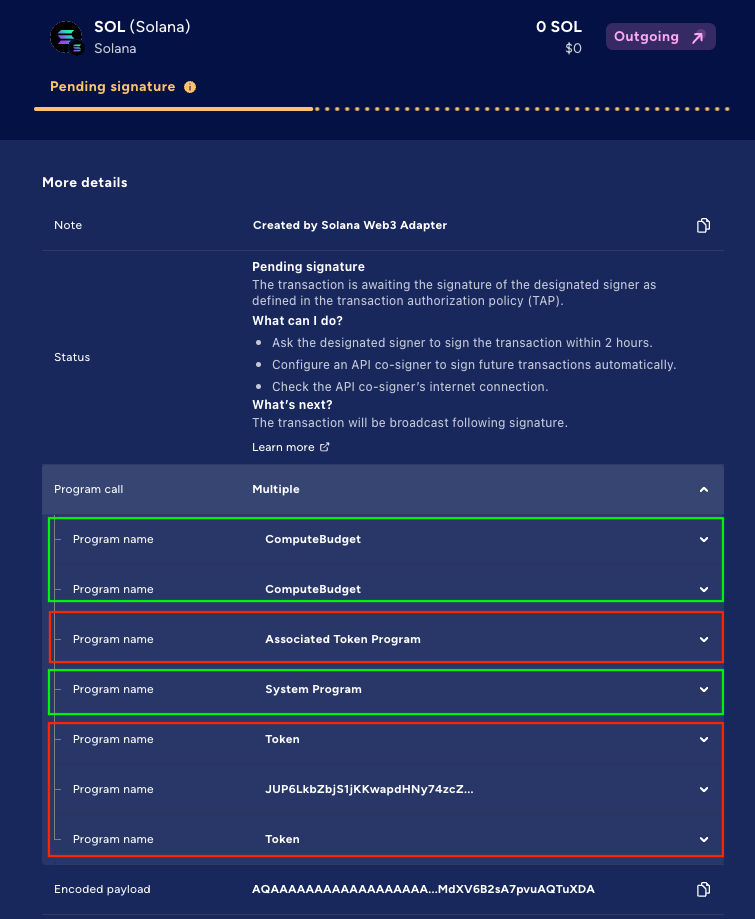 In the example above, **Programs 1, 2, and 4 (Green)** are automatically whitelisted. However, in this scenario, the customer must manually whitelist the following programs (Red):
1. **Associated Token Program**
2. **Token Program**
3. **Program #6**, which is a custom **Jupiter program**
**Looking for a program's address?**
You can expand a specific program's section to view its address (the `programId` value).
Additionally, expanding the **System Program** section reveals that this program includes a single instruction: `Transfer`. Expanding the `Transfer` instruction shows that, as expected, two accounts are involved:
* **`from`account** (index 1)
* **`to`account** (index 2)
To ensure the `Program Call` operation functions correctly, the `pubkey`value of the`to` address must be whitelisted.
In the example above, **Programs 1, 2, and 4 (Green)** are automatically whitelisted. However, in this scenario, the customer must manually whitelist the following programs (Red):
1. **Associated Token Program**
2. **Token Program**
3. **Program #6**, which is a custom **Jupiter program**
**Looking for a program's address?**
You can expand a specific program's section to view its address (the `programId` value).
Additionally, expanding the **System Program** section reveals that this program includes a single instruction: `Transfer`. Expanding the `Transfer` instruction shows that, as expected, two accounts are involved:
* **`from`account** (index 1)
* **`to`account** (index 2)
To ensure the `Program Call` operation functions correctly, the `pubkey`value of the`to` address must be whitelisted.
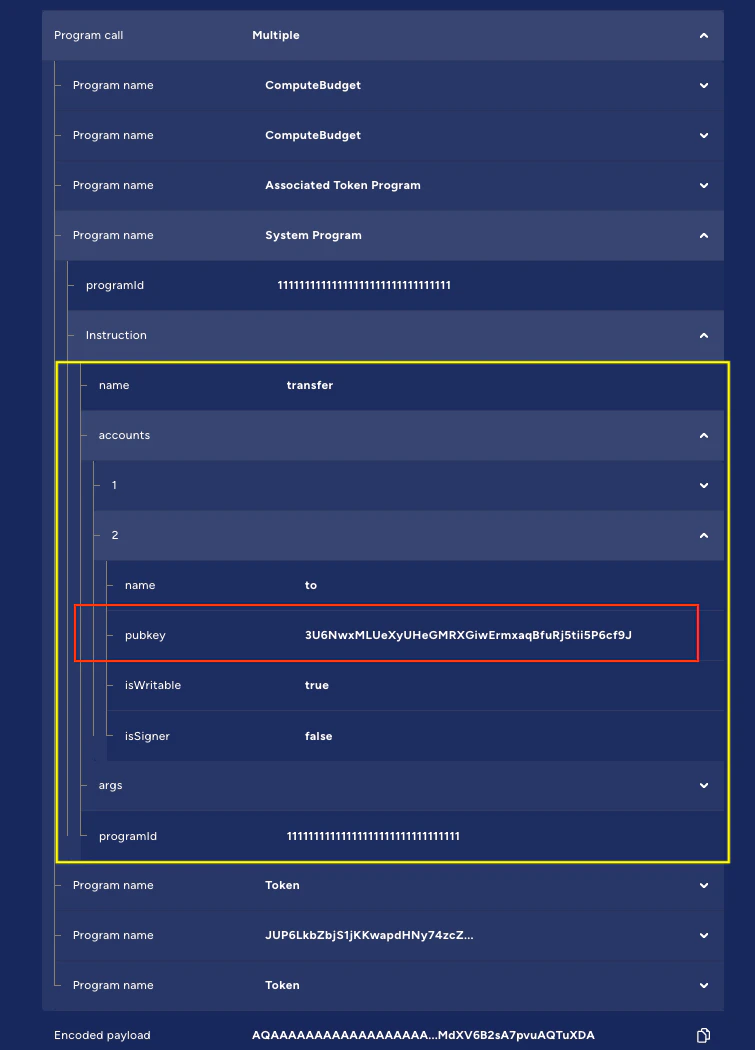 **For demonstrative purposes only**
The addresses shown above are for demonstrative purposes only! Customers should always review and determine which addresses need to be whitelisted based on the specific Program Call context relevant to their use case.
***
# How do program calls work on Fireblocks?
To make a Solana program call using the Fireblocks API, you will:
1. **Build the Solana Transaction:** Use the Solana `web3.js` library or other tools to construct the unsigned transaction. Ensure the transaction includes all necessary instructions and accounts.
**Note:** Fireblocks supports legacy and versioned v0 Solana transaction payloads only. Transactions built with any other message version are not supported and will fail with INTERNAL\_ERROR.
2. **Serialize and Encode:** Serialize the unsigned transaction object and encode it in Base64 format.
3. **Call Fireblocks API:**
1. Use the Create Transaction endpoint.
2. Set the operation parameter to `PROGRAM_CALL`.
3. Pass the serialized, Base64 encoded transaction object in the `programCallData` parameter within the `extraParams` object.
Fireblocks securely signs the transaction using your organization’s private key, ensuring seamless execution without exposing sensitive cryptographic materials.
## Example transaction structure
Below is a sample payload for invoking a Solana program using the [Create Transaction API](/reference/createtransaction) :
```json theme={"system"}
{
"operation": "PROGRAM_CALL",
"assetId": "SOL",
"source": {
"type": "VAULT_ACCOUNT",
"id": ""
},
"extraParameters": {
"programCallData": ""
}
}
```
#### Parameters
1. **operation:** Must be `PROGRAM_CALL` for Solana program calls.
2. **assetId:** Use SOL for Solana mainnet transactions, SOL\_TEST for devnet.
3. **source:** The vault account ID that holds the funds and signs the transaction.
4. **extraParams.programCallData:** The unsigned, serialized transaction object (Base64 encoded).
5. **extraParams.useDurableNonce:** (Optional; boolean) The configurable durable nonce. The default is `true`.
6. **extraParams.signOnly:** (Optional; boolean) Set to `true` to sign the transaction without submitting it to the blockchain. The default is `false`.
### Durable nonce and sign-only mode usage
#### Durable nonce usage
By default, Fireblocks includes a [durable nonce](https://solana.com/developers/courses/offline-transactions/durable-nonces) in your transaction by adding an `AdvanceNonce` instruction. This ensures the transaction remains valid even if it's not immediately submitted.
Set **useDurableNonce** to `false` to use the recent blockhash instead. This reduces transaction size, which may be necessary to stay within Solana's maximum transaction size limit.
**useDurableNonce** is only used with Solana Program Calls. Other transactions do not use this field and will ignore its value.
#### Sign-only mode usage
Use sign-only mode when you want to sign a transaction but submit it to the blockchain through another method or service.
After you sign a transaction, it normally moves from `PENDING_SIGNATURE` to `BROADCASTING` as Fireblocks submits it to the blockchain. When you enable sign-only mode, the transaction moves from `PENDING_SIGNATURE` to `SIGNED` instead. Fireblocks doesn't submit the transaction, but updates its status to `COMPLETED` if the blockchain includes it in a new block.
**signOnly** is only used with Solana Program Calls. Other transactions do not use this field and will ignore its value.
# Fireblocks Solana Web3 Connection Adapter
[The Fireblocks Solana Web3 Connection Adapter](/reference/solana-web3-adapter) serves as a bridge between the Fireblocks API and the Solana blockchain, streamlining transaction submissions via Fireblocks when using Solana's official `web3.js` library.
**For demonstrative purposes only**
The addresses shown above are for demonstrative purposes only! Customers should always review and determine which addresses need to be whitelisted based on the specific Program Call context relevant to their use case.
***
# How do program calls work on Fireblocks?
To make a Solana program call using the Fireblocks API, you will:
1. **Build the Solana Transaction:** Use the Solana `web3.js` library or other tools to construct the unsigned transaction. Ensure the transaction includes all necessary instructions and accounts.
**Note:** Fireblocks supports legacy and versioned v0 Solana transaction payloads only. Transactions built with any other message version are not supported and will fail with INTERNAL\_ERROR.
2. **Serialize and Encode:** Serialize the unsigned transaction object and encode it in Base64 format.
3. **Call Fireblocks API:**
1. Use the Create Transaction endpoint.
2. Set the operation parameter to `PROGRAM_CALL`.
3. Pass the serialized, Base64 encoded transaction object in the `programCallData` parameter within the `extraParams` object.
Fireblocks securely signs the transaction using your organization’s private key, ensuring seamless execution without exposing sensitive cryptographic materials.
## Example transaction structure
Below is a sample payload for invoking a Solana program using the [Create Transaction API](/reference/createtransaction) :
```json theme={"system"}
{
"operation": "PROGRAM_CALL",
"assetId": "SOL",
"source": {
"type": "VAULT_ACCOUNT",
"id": ""
},
"extraParameters": {
"programCallData": ""
}
}
```
#### Parameters
1. **operation:** Must be `PROGRAM_CALL` for Solana program calls.
2. **assetId:** Use SOL for Solana mainnet transactions, SOL\_TEST for devnet.
3. **source:** The vault account ID that holds the funds and signs the transaction.
4. **extraParams.programCallData:** The unsigned, serialized transaction object (Base64 encoded).
5. **extraParams.useDurableNonce:** (Optional; boolean) The configurable durable nonce. The default is `true`.
6. **extraParams.signOnly:** (Optional; boolean) Set to `true` to sign the transaction without submitting it to the blockchain. The default is `false`.
### Durable nonce and sign-only mode usage
#### Durable nonce usage
By default, Fireblocks includes a [durable nonce](https://solana.com/developers/courses/offline-transactions/durable-nonces) in your transaction by adding an `AdvanceNonce` instruction. This ensures the transaction remains valid even if it's not immediately submitted.
Set **useDurableNonce** to `false` to use the recent blockhash instead. This reduces transaction size, which may be necessary to stay within Solana's maximum transaction size limit.
**useDurableNonce** is only used with Solana Program Calls. Other transactions do not use this field and will ignore its value.
#### Sign-only mode usage
Use sign-only mode when you want to sign a transaction but submit it to the blockchain through another method or service.
After you sign a transaction, it normally moves from `PENDING_SIGNATURE` to `BROADCASTING` as Fireblocks submits it to the blockchain. When you enable sign-only mode, the transaction moves from `PENDING_SIGNATURE` to `SIGNED` instead. Fireblocks doesn't submit the transaction, but updates its status to `COMPLETED` if the blockchain includes it in a new block.
**signOnly** is only used with Solana Program Calls. Other transactions do not use this field and will ignore its value.
# Fireblocks Solana Web3 Connection Adapter
[The Fireblocks Solana Web3 Connection Adapter](/reference/solana-web3-adapter) serves as a bridge between the Fireblocks API and the Solana blockchain, streamlining transaction submissions via Fireblocks when using Solana's official `web3.js` library.