
Events
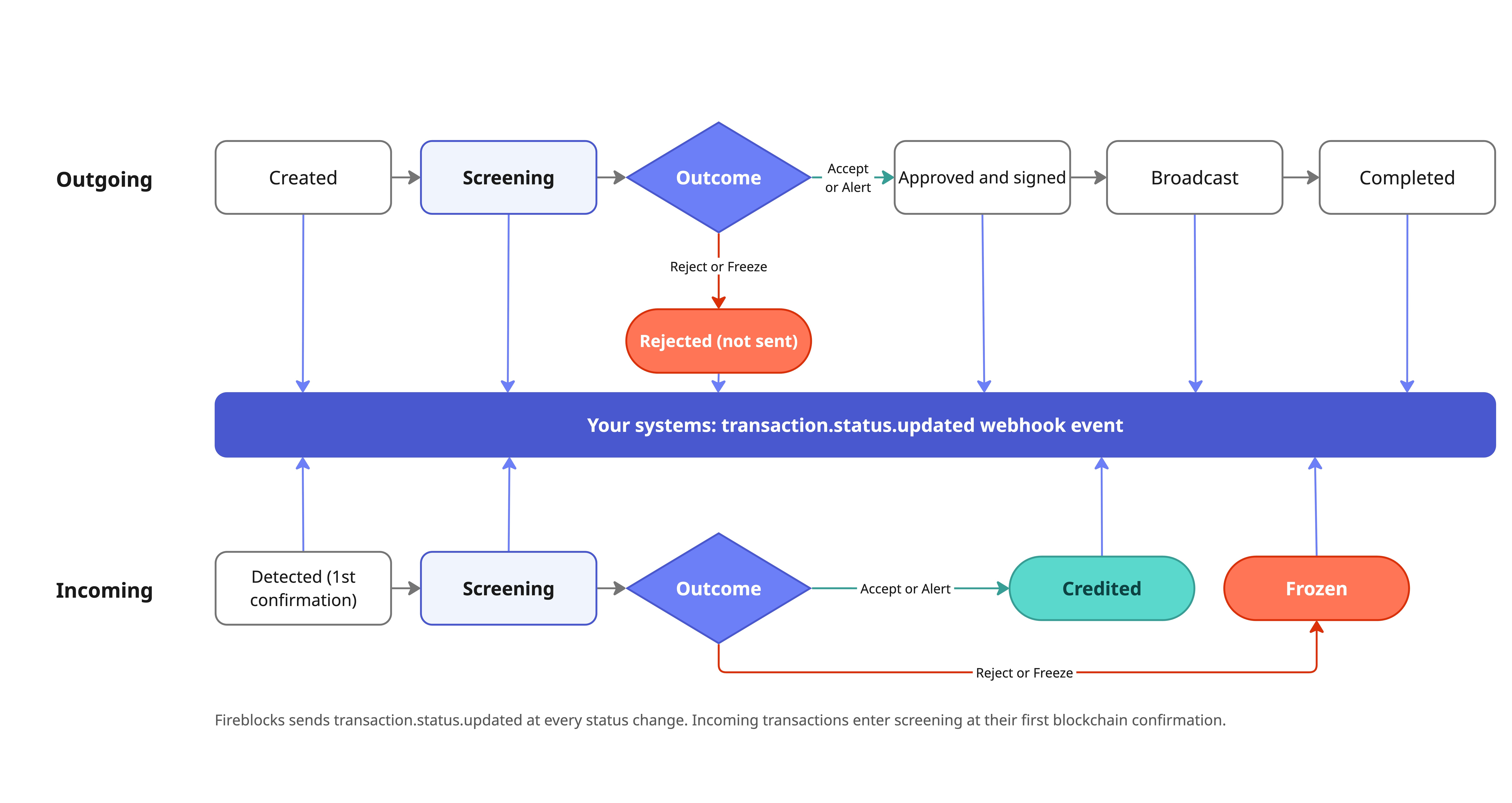
transaction.status.updated at every status change, outgoing and incoming. For what each status and subStatus means, see Transaction states.
Subscribe
- Webhooks v2: set up an endpoint and subscribe to the events you need. See Webhooks Overview.
- Compliance notifications: in the Console, go to Settings > Notifications > Webhooks > Create Webhook, and select Compliance.
- Verify each event’s signature before processing it. See Validating webhooks.
- Acknowledge fast: return
200right away and process asynchronously. - Do not rely on order: events can arrive out of order. Compare against the transaction’s current state.
- Deduplicate on the notification
id. For Travel Rule notifications, usedestinationScreeningIdwhen present; otherwise, use the envelopeid. - Re-fetch before acting: read the current state from the API before bypassing, rescreening, unfreezing, or submitting a verdict.
- Recover missed events: Webhooks v2 can resend notifications for up to 30 days. See Resending & troubleshooting webhook notifications.
Get full details on a status event
Thedata object of transaction.status.updated is the full transaction. Its subStatus does not say which check made the decision; read the complianceResults object, which carries every check’s result (provider, verdict, risk level) when the event includes it. amlScreeningResult is a legacy object; use complianceResults instead.
For the raw provider payload, call GET /screening/transaction/{txId}. See Read the result for the fields.
Travel Rule notifications (Sumsub, GTR)
These are audit-log notifications in the Compliance category (categoryId: "7"), not Webhooks v2 events. Tell them apart by note.messageType. note is a JSON-encoded string: parse it first. Only screeningMessage and messageType are always present.
TRLink.RequiredActions: a Travel Rule message needs more data. Sent once per destination.
TRLink.NoTRMessage: a transaction that needs a Travel Rule message has none. Includes the txId, destinationScreeningId, and destination details. Create and link a message, or submit a manual decision.
For both flows, see Sumsub and GTR.