
REST API
Fireblocks offers a robust REST API that enables developers to leverage Fireblocks’ capabilities programmatically. Our REST API serves as the foundation for all Fireblocks SDKs. To browse and call endpoints directly, see the API Endpoints Overview. To practice with our API before implementing any code, read the Postman Guide containing the pre-defined API endpoints.OpenAPI specification
View the Fireblocks OpenAPI 3.0 specification. Fireblocks uses the OpenAPI 3.0 (Swagger) format to maintain our API and provide the specification file for download. The API Reference section is auto-generated from our OpenAPI specification. You can also import it into your tool of choice, such as Swagger UI, ReDoc, and so on.Generate client libraries and SDKs
Using the Swagger Editor, you can generate your client libraries and SDKs in the language of your choice.- Navigate to the publicly hosted Swagger Editor.
- Copy our latest OpenAPI specification file and paste it into the editor window.
- Select Generate Client on the top menu bar and select the language to download.
- Set up the proper headers to authenticate with the Fireblocks API. See JWT structure for details. You can review how our SDKs sign requests and replicate the same approach in your generated client library.
Fireblocks Developers Hub
Visit our Developers Hub GitHub repository for code examples, snippets, and other helpful resources that you can use as a reference.Language-specific SDKs & guides
Fireblocks supports and maintains SDKs in JavaScript and Python to help you interact with the Fireblocks API. We also offer guides for languages in which we don’t have an active SDK. These guides provide you with a simple example to get you started and quickly pass the first hurdles of securely signing API requests:Need help deciding which language to use?
Use the following decision tree to help you decide which Fireblocks SDK is best for your use case.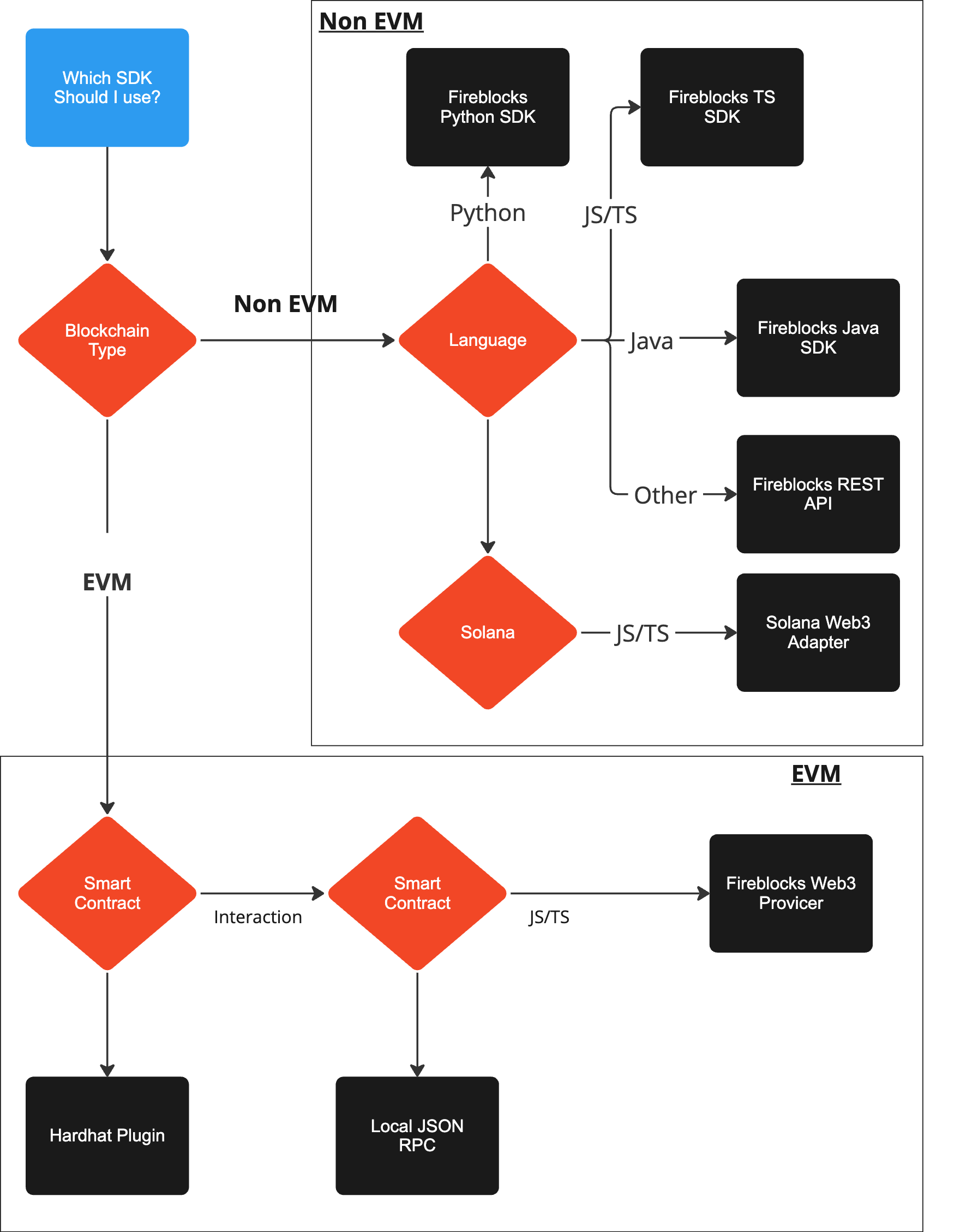
Web3/Smart Contract
Fireblocks offers Web3 connector SDKs for developers who use a base library as part of their tech stack and want Fireblocks to act as the underlying wallet and security layer:- EVM Web3 Provider: Learn about using
ethers.js,web3.jsorweb3.pywith Fireblocks as the Web3 Provider.
Additional Tools
- Fireblocks Hardhat Plugin - An easy-to-use plugin to enable Fireblocks signing for smart contract deployment using Hardhat. More information at Fireblocks Hardhat plugin guide.
- Fireblocks Local JSON RPC - A locally running EVM JSON RPC module that uses the Web3 Provider to use Fireblocks as the signing mechanism. This allows you to plug Fireblocks into any of the tools that require a JSON RPC URL, including different development and deployment tools. More information at Fireblocks Local JSON RPC Guide.