
Unsure about which custody model is right for you? Read our “Guide to Digital Asset Wallets and Service Providers” for insights into evaluating digital asset wallet and service providers for your business
Custody models
- Vault wallets (direct custody): Assets sit in vault accounts in your Fireblocks workspace. Your organization controls them through the approvals and Policies you configure. Direct custody is a type of self-custody with no counterparty risk, because you remain the owner and controller of your assets. To learn more, see What is Fireblocks? and Self-Custody Infrastructure.
- Embedded wallets (non-custodial): Wallets are created inside your application for your customers. Your customers control their wallets, whether they are individuals, teams, or businesses. By default, neither you nor Fireblocks can move a customer’s funds without that customer’s participation. To learn more, see Embedded Wallets.
Both wallet types use MPC
Both kinds of wallet are secured by Multi-Party Computation (MPC). With MPC, a private key is represented by key shares that are held by different parties. The shares work together to sign a transaction without ever assembling the full private key in one place. This removes the single point of failure that comes with a traditional private key or seed phrase. The two wallet types apply MPC differently because they serve different custody models:- Vault wallets use the Fireblocks MPC-CMP protocol. The key is split into three key shares. You hold one of them on an API Co-signer or a mobile device.
- Embedded wallets use a Threshold Signature Scheme (TSS-MPC). The default setup is 2-of-2, with one key share on the customer’s device and one server share. Fireblocks generates and encrypts the server share inside a Trusted Execution Environment (TEE). It also takes part in signing there.
Vault wallets
Vault wallets are the asset wallets inside the vault accounts of your Fireblocks workspace. They are the foundation of the Fireblocks direct custody model. You create and manage them with the Console or the Fireblocks API.Hot, warm, and cold MPC-CMP wallets
Fireblocks wallets can be hot, warm, or cold. What separates these types of wallets is where the third MPC key share is held, and how transaction approvals are conducted.- With a hot wallet, the third MPC key share is held by an API user on an API co-signer, and transaction approvals can be automated.
- With a warm wallet, the third MPC key share is held on your internet-connected mobile device, and approvals occur on the Fireblocks mobile app.
- With a cold wallet, the third MPC key share is held on your air-gapped (offline) mobile device. Approvals for transactions require bi-directional QR code scanning.
Structure
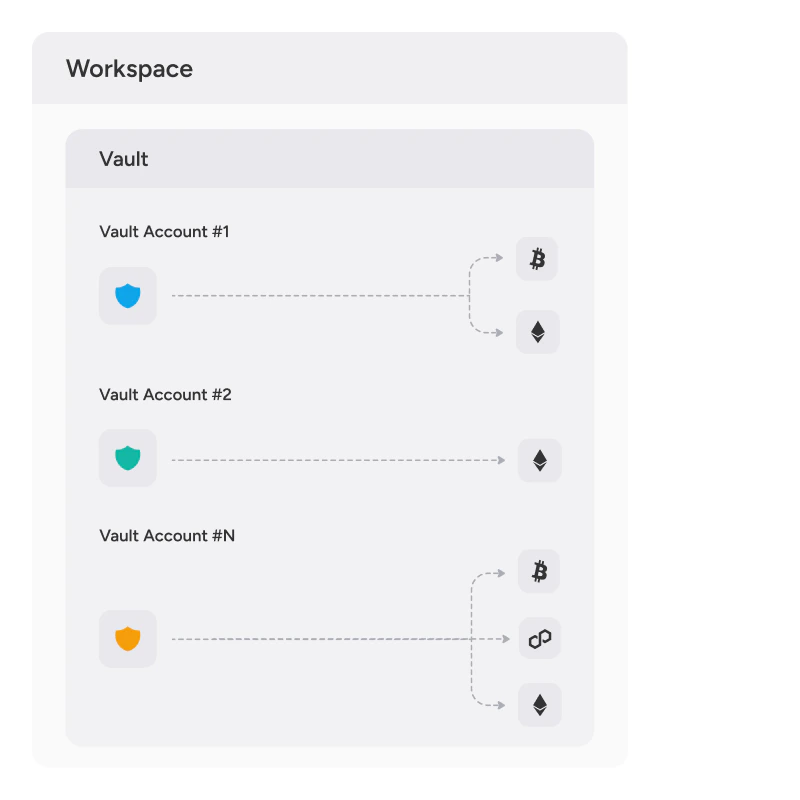
- The main section of the workspace is the Fireblocks Vault which holds all MPC wallets.
- Inside the Vault, an unlimited number of vault accounts can be created. This allows to segregate between distinct clients and various use cases.
- Each vault account can hold as many asset wallets as you need. However, you can only have one wallet per asset.
- In a vault account, asset wallets can accommodate numerous deposit addresses for UTXO-based assets, while account-based assets are assigned with a single address.
Secret key management and wallet derivation
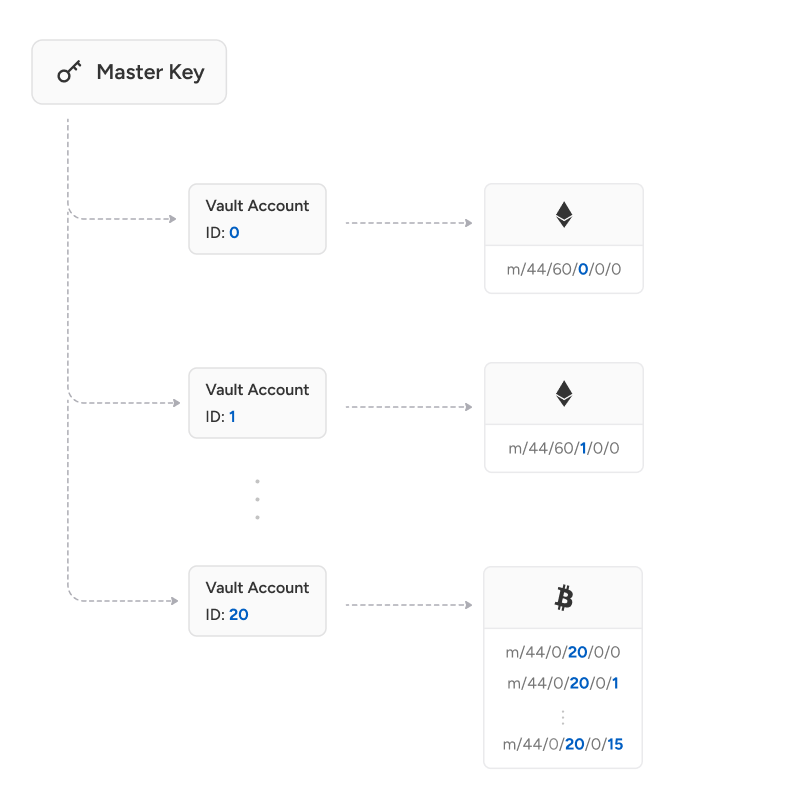
- m: master private key
- purpose: the derivation standard (BIP44 in our example)
- coinType: the unique identifier of an asset (0 for BTC, 60 for ETH, etc.)
- account: the vault account ID
- change: always 0
- index: the address index (always 0 except for UTXO based assets such as Bitcoin)
Embedded wallets
Embedded wallets let you offer a wallet inside your own web or mobile application, with no browser extension or seed phrase for your customers to manage. The wallets are non-custodial: they are always owned and controlled by your customers, whether individuals, teams, or businesses. Customers can export their wallets at any time.How it works
Embedded wallets use TSS-MPC with a default 2-of-2 configuration and two key shares:- The user share is stored on the customer’s device.
- The server share is generated and encrypted inside a Trusted Execution Environment (TEE) and takes part in signing there.
Learn more
- Embedded Wallets: Get started with embedded wallets, including the key capabilities and links to the SDK guides.
- Embedded wallet MPC overview: Read about the MPC architecture, key sharing models, and recovery flows.
- How key shares work: See how the user share and the server share coordinate to sign.
- Key sharing models: Compare the 2-of-2 and 2-of-3 configurations.